In the business world of 2026, no one uses a single system. The average business uses 110 different SaaS tools (according to Productiv), and that number keeps growing. Email, LinkedIn, WhatsApp Business, Google Calendar, accounting systems, marketing tools, websites – and more. The problem? All important customer information is scattered across 10 different places.
According to a MuleSoft study, sales professionals waste 4.8 hours per week just copying information between different systems. That’s 28% of the work week. 28% of time goes to Copy-Paste instead of actual selling!
The Solution: A CRM system that connects to everything you already have.
BROSH CRM isn’t just a customer management system – it’s a nerve center (Hub) that connects to all the tools you use: LinkedIn, Gmail, Google Workspace, WhatsApp Business, mobile apps, websites, accounting systems – all with a simple click.
In this comprehensive article, we’ll learn about all of BROSH’s smart integrations: how they save hours of work, how they turn every system into an “automatic lead source,” and how they allow you to work with the tools you already love – while all information syncs automatically to BROSH.
Why Are Integrations the Key to CRM Success?
Ask yourself: Where is the important customer information located?
- 💬 WhatsApp conversations – customer wrote “I’m interested in pricing”
- 📧 Gmail emails – price quote, signed contract
- 💼 LinkedIn – contact who showed interest, questions in messages
- 📅 Google Calendar – meeting with them next week
- 🌐 Website form – filled in contact details
- 📱 SMS – confirmed shipment approval
If all this data isn’t centralized in one place – you’re working blind. Salesperson A doesn’t know Salesperson B already spoke with the customer. The manager doesn’t see what’s really happening. The customer receives 3 different messages from different people.
Benefits of Integrations:
- ✅ Centralized information – entire customer history from all sources
- ✅ Automatic updates – no need for manual Copy-Paste
- ✅ Massive time savings – 4.8 hours/week according to MuleSoft
- ✅ Fewer errors – automation = accuracy
- ✅ Complete picture – see everything about the customer, not just parts
- ✅ Smart automation – “Email arrives → automatic task creation”
- ✅ Work in tools you love – no need to leave Gmail/LinkedIn
The Statistics Speak for Themselves:
- 86% of employees believe lack of integration/collaboration causes work failures (Salesforce)
- 60% of companies say integrations are a decisive factor in choosing CRM tools (Gartner)
- Productivity increases by 49% in companies with good integrations (Zapier)
- Conversion rates 26% higher when information flows smoothly between systems (HubSpot)
BROSH CRM’s Smart Integrations
BROSH connects to all the tools you use daily, building one unified ecosystem. Here are the main integrations:
1. LinkedIn Integration – Turning Connections into Deals 💼
LinkedIn is a huge lead source – 900 million users, most of them business professionals. But how do you turn a “LinkedIn connection” into a real customer? That’s exactly where BROSH excels.
What Does the BROSH LinkedIn Extension Do?
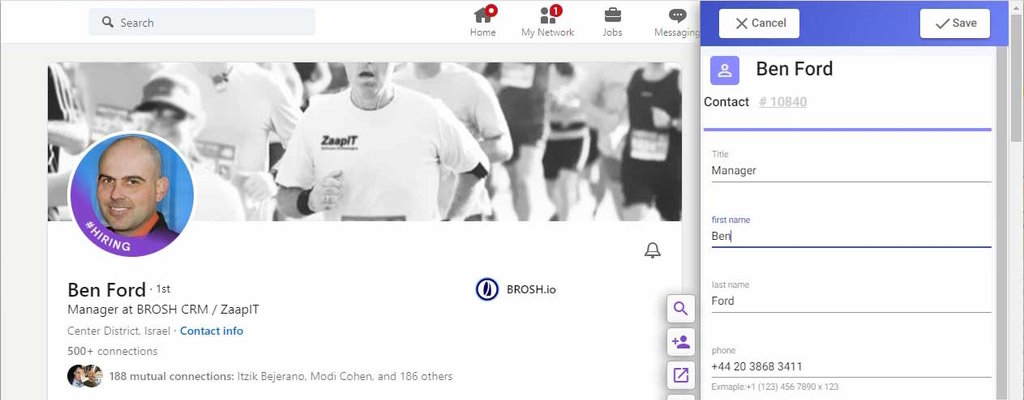
- 🔍 Automatic system search: When you open a LinkedIn profile, BROSH automatically searches if the contact already exists in your system
- ➕ One-click addition: Doesn’t exist? One click – and the person is added to the system including all profile details (name, title, company, location)
- 📧 Automatic email extraction: BROSH identifies and pulls email addresses from the profile (if available)
- 📝 Instant activity logging: “Sent message on LinkedIn” → automatically recorded in customer card
- 🔔 Smart alerts: “This contact already exists in the system – don’t send a duplicate message!”
- 🎯 Multi-user sync: Multiple salespeople working on LinkedIn? All contacts sync to central system
- 📊 Sales Navigator Integration: Bulk import leads from Sales Navigator directly to BROSH
How does this save time? Instead of manually copying details and tracking in Excel – everything’s automatic. Saves 2-3 hours per day per salesperson.
2. Gmail & Google Workspace – Turning Emails into Customers 📧
Email is still the #1 communication channel in B2B businesses. According to Litmus, 99% of people check email daily, and 86% prefer email over any other channel for business communication.
How it works:
- 📩 Bi-directional sync: Emails to/from customers automatically sync to customer card in BROSH
- 🔍 Email search: Email from unknown address? BROSH automatically searches if sender exists in system
- ➕ Create new contact: Email from new lead? One click – added to system including all correspondence
- ✉️ Send emails from BROSH: Send emails directly through BROSH (via your Gmail)
- 📎 Attachments: All files sent/received saved in customer card
- 🤖 Automatic templates: Recurring emails (price quotes, order confirmations) – ready templates with auto-fill
- 📊 Open tracking: Customer opened email? Clicked link? BROSH tracks it
- 🔔 Automatic alerts: “VIP customer sent email – handle immediately!”
3. Google Calendar – Automatic Meeting Sync 📅
Scheduled a meeting with a customer? It should appear in CRM too.
- 📆 Meeting sync: Meeting in Google Calendar → automatically appears in customer card in BROSH
- 🔔 Automatic reminders: “Meeting with customer X in one hour”
- 📝 Meeting preparation: See entire history in BROSH before meeting
- ✅ Meeting documentation: After meeting – add summary with one click
4. WhatsApp Business – Direct and Fast Communication 💬
WhatsApp is the preferred communication method for 2 billion users. In Israel, 95% of the population uses WhatsApp daily.
- 💬 Message sync: WhatsApp conversations with customers sync to BROSH
- 🤖 Automatic messages: “Thank you for reaching out, we’ll get back to you soon”
- 📊 Conversation tracking: All WhatsApp correspondence saved in customer card
- 👥 Multi-user management: Multiple service reps answering customers? Everyone sees history
- 🎯 Marketing campaigns: Send bulk messages (while complying with WhatsApp Business laws)
5. Website Integration – Forms and Leads 🌐
- 📝 Contact forms: Form submission → lead creation in BROSH automatically
- 🛒 Abandoned carts: Someone started order but didn’t finish? BROSH logs and alerts
- 💳 Website orders: New order → new deal in BROSH
- 🤖 Automations: “New lead from website → send automatic email → create task for salesperson”
6. Open API for Developers – Full Customization 🔧
Have a unique system? Internal software? No problem – BROSH offers a full RESTful API.
- 🔌 Connect any system: ERP, accounting, inventory management, anything
- 📊 Data import/export: Bi-directional sync with existing systems
- 🤖 Custom automations: Build your exact business flow
- 📚 Detailed documentation: API guides, code examples, developer support
7. Accounting and ERP Integration 💰
- 💳 Automatic invoices: Deal closed in BROSH → invoice in accounting system
- 💰 Payment updates: Customer paid → status updates in BROSH
- 📊 Unified reports: Sales vs. actual revenues
- 🔄 Customer sync: Customer list synced between systems
Supported systems: QuickBooks, SAP, Priority, and more.
Case Studies: How Integrations Transformed Businesses
Case 1: Consulting Firm – From 30 Leads/Month to 180 Thanks to LinkedIn
A business consulting firm with 5 consultants faced tracking and collision issues.
Results with BROSH:
- New leads grew 6x (from 30 to 180 per month)
- 0 duplicates – no more “collisions” between consultants
- Response time dropped from 3 days to 4 hours – “hot” leads don’t cool down
- Conversion rate up 34% – more leads became customers
- ROI: 850% in first year
Case 2: Online Store – Full Automation from Website to CRM
Results:
- Saved 3 hours/day – no more manual data entry
- Cart recovery: 15% – 75 additional orders per month from abandoned carts
- 0 invoice errors – automation = accuracy
- Customer satisfaction rose to 4.7/5 – automatic updates
- Revenue up 22% in first year
Case 3: B2B Startup – From Gmail Chaos to Complete Order
Results:
- Dramatic improvement in internal communication – everyone in the loop
- Response time dropped from 48 hours to 2 hours
- 0 “lost emails” – everything documented
- Deal closure rate up 41%
- Investors impressed by professionalism – raised another round
How to Get Started with BROSH Integrations – Step-by-Step Guide
Step 1: Install Extensions
- Go to Chrome Web Store
- Search for “BROSH for LinkedIn and Gmail”
- Click “Add to Chrome”
- Sign in with your BROSH account
- Done – extension is active
Step 2: Connect Gmail
- In BROSH, go to Settings → Integrations
- Click “Connect Gmail”
- Give BROSH permission to access emails
- Choose which emails to sync
- Sync starts automatically
Step 3: Add Additional Accounts
- Each salesperson installs the extension
- All information syncs to central system
- Set permissions – “who sees what?”
- Set rules – “new lead → notify manager”
Step 4: Automations
- Build workflows – “email arrives → create task”
- Set up templates – recurring emails
- Set alerts – “customer hasn’t received response in 24 hours”
- Configure scripts – “new lead → send Welcome Email”
Best Practices for Optimal Integration Use
1. Start Small, Expand Gradually
- Don’t connect everything at once
- Start with Gmail + LinkedIn
- As team gets comfortable – add more
2. Train the Team
- Installed extension ← doesn’t mean they use it
- Dedicate an hour for training
- Show benefits in practice
3. Set Clear Rules
- Who’s responsible for what?
- What information must be documented?
- What’s the policy on duplicate leads?
4. Monitor and Review
- Weekly reports – how many leads added?
- Check automations – working?
- Ask the team – what works? What doesn’t?
5. Keep Data Clean
- Integrations ← lots of data coming in
- Maintain regular data cleansing
- Remove duplicates
Summary: Integrations = The Future of CRM
In the world of 2026, CRM cannot be an “isolated island”. It must connect to all the tools the business uses daily.
BROSH CRM’s integrations transform it not just into a customer management system, but into the nerve center of the entire business:
- 🔗 LinkedIn – turn business connections into customers
- 📧 Gmail – all correspondence in one place
- 📅 Google Calendar – automatic meeting coordination
- 💬 WhatsApp Business – direct and fast communication
- 🌐 Website – automatic leads and orders
- 💰 Accounting – sales vs. revenues
- 🔧 Open API – connect any system you want
The result?
- ✅ Save 4-6 hours/week per employee
- ✅ Complete, updated information on every customer
- ✅ Fewer errors, more accuracy
- ✅ Work in tools you love
- ✅ Automation working for you 24/7
- ✅ Happy, productive team
- ✅ More sales, less hassle
With BROSH CRM, you don’t have to choose between “tool I love” and “tool the company forces.” You work in Gmail, LinkedIn, WhatsApp – and BROSH unites everything into one smart, automatic central system.
Want to learn more? Read our guides on efficient customer relationship management, building winning customer journeys, and advanced digital marketing strategies.